For inquiries related to order or shipping, please contact us at contact@animalhospital.store
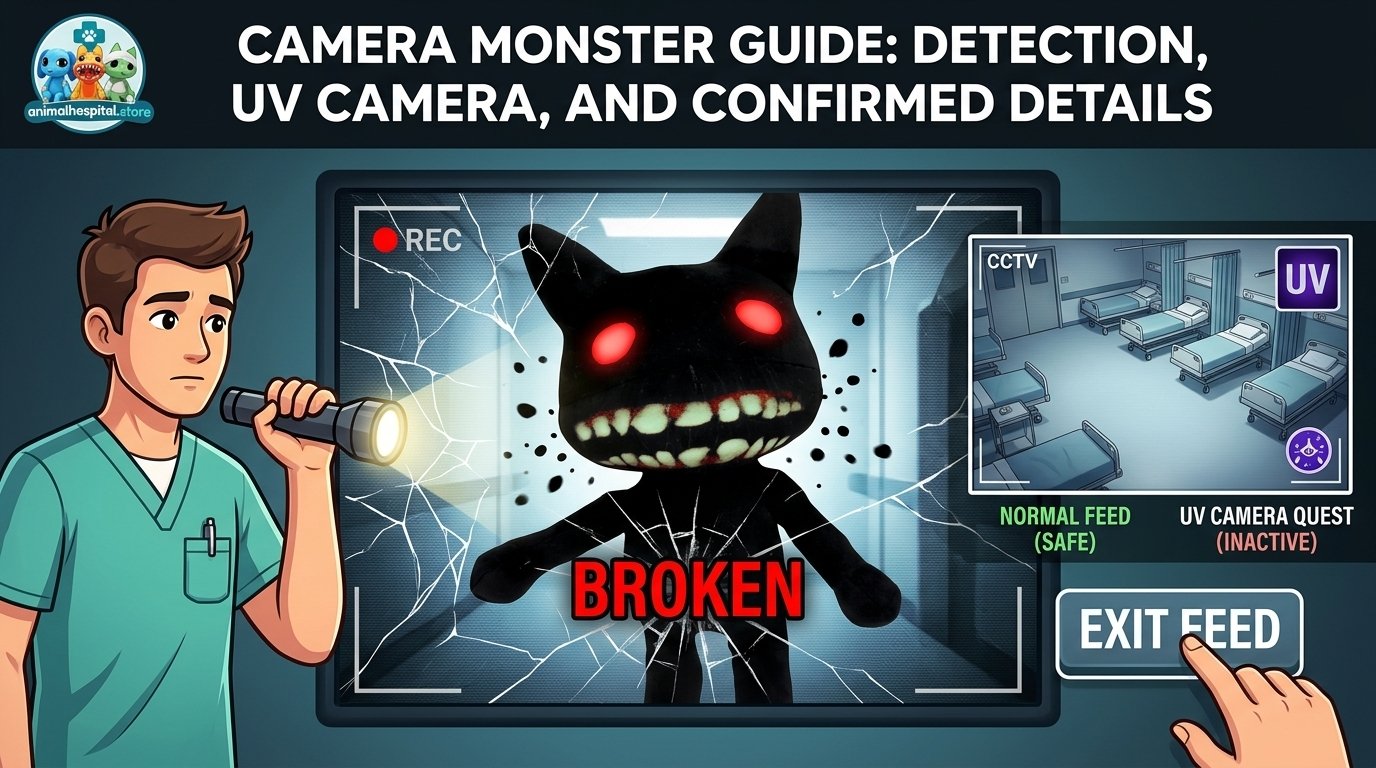
The Camera Monster is a security-camera enemy in Animal Hospital. It can appear on a broken regular security camera and moves closer while you continue watching the feed.
If it appears, switch to another camera or close the camera menu before it reaches the screen. Repairing the broken camera is also reported to prevent the encounter. The UV Camera is a separate quest item and is not established as a counter to the Camera Monster.
How the Camera Monster is detected
Animal Hospital uses more than one way to reveal abnormal activity. A patient can show a visible difference at reception, appear unusual in the developed photograph, or display an abnormality on CCTV. The community guide from TheSpike describes these as three complementary checks:
- Direct inspection: compare the patient with the details you expect to see.
- Developed photo: check whether the photograph reveals a difference that was not obvious in person.
- CCTV review: inspect the security feeds for camera-only abnormalities or hazards.
That system matters because the Camera Monster belongs to the CCTV side of the game rather than the ordinary patient-check process. The Animal Hospital Database records it as an enemy that can only be seen through security cameras. It does not describe the creature as a patient anomaly that should be admitted or rejected at the reception window.
Seeing the creature on a security feed is the warning. Continuing to watch it is what creates the immediate danger.
What happens on a broken security camera
The available full-read community record describes a specific sequence. The Camera Monster can appear when you check a broken security camera, with the chance reported as approximately 50 percent. That figure comes from community documentation, so it should be treated as a documented estimate rather than a guaranteed value for every Shift.
The figure is described as a dark, cat-like shape with red glowing eyes, crooked teeth and black circular particles around it. These visual details identify the enemy in the feed, but the response is more important than the appearance: do not stay on that camera waiting to see what happens.
While the feed remains open, the creature moves closer to the screen. The camera menu may disappear at first, then return after a few seconds while the monster continues its approach. If it reaches the final stage, the game triggers a jumpscare with a screen shake and loud screech.
The same record reports that the completed jumpscare costs 20 sanity. Because this mechanic is documented by community databases rather than by a detailed official mechanics page, the safest wording is that a 20-sanity loss is reported, not that every version of the game must use that value permanently.
How to avoid the jumpscare
You do not need to wait for the Camera Monster to disappear. The documented response is to switch to another security feed or close the camera interface before the jumpscare activates.
- Notice that the feed is broken.
- Watch for the Camera Monster if it appears.
- Switch cameras or close the security-camera menu immediately.
- Do not remain on the feed to observe the full approach.
The community record also says that leaving the camera before the jumpscare prevents the monster from appearing again on that same broken camera. The same result is reported after the jumpscare has already occurred. That gives the encounter a limited, camera-specific pattern in the documented mechanics, although the sources do not establish whether every related camera interaction behaves identically in every current version.
Does repairing the camera stop it?
Repairing broken security cameras is repeatedly described as prevention rather than a reaction. The Camera Monster is tied to the broken-camera condition, so a repaired camera no longer provides the condition under which the enemy is reported to appear.
This is different from escaping the feed. Closing the camera menu deals with the immediate encounter. Repairing the camera deals with the broken equipment that allows the encounter to occur. If your goal is to reduce the chance of seeing the enemy on that feed, repair the camera when the game allows it.
Can it appear on a Deployable Camera?
The Animal Hospital Database states that the Camera Monster can appear on regular security cameras but cannot appear on a Deployable Camera. The same distinction is repeated in community guide material. Based on those sources, Deployable Cameras are not treated as another trigger for this enemy.
That does not mean every camera is safe from every anomaly. TheSpike’s guide separates camera-based abnormalities from this particular enemy, and a CCTV check can still matter for detecting patients or other events. The specific claim is narrower: current community documentation does not report the Camera Monster appearing on a Deployable Camera.
How the UV Camera fits into the game
The UV Camera is associated with Liz’s investigation and should not be confused with the hospital’s ordinary security-camera system. Community guides describe Liz lending the player a UV Camera for a sequence involving photographs of named patients. One guide reports four requested patient photographs, with the quest affected if the wrong subject is photographed.
That makes the UV Camera a quest-specific item in the available documentation. It is used to photograph people connected to Liz’s requests, while the regular security cameras are used to review rooms and detect camera-based abnormalities.
The sources do not establish the UV Camera as a counter to the Camera Monster. They also do not establish that the UV Camera reveals a hidden stage of this enemy. Those ideas appear in community interpretations and short-form discussions, but the available evidence is not strong enough to present them as canon.
| Tool or check | Documented purpose | What the sources establish |
|---|---|---|
| Reception inspection | Examine the patient directly | A normal part of the anomaly-detection loop |
| Developed photo | Compare the patient photograph for hidden differences | A separate patient-check method |
| Security Camera | Review CCTV feeds | Can show camera-only abnormalities and can expose the broken-camera hazard |
| Deployable Camera | Provide a camera feed from a placed location | Reported not to trigger the Camera Monster |
| UV Camera | Photograph Liz’s requested patient targets | Quest-related tool; not established as the Camera Monster counter |
Camera Monster versus a patient anomaly
The distinction is easy to miss because both systems can involve CCTV. A patient anomaly is part of the hospital’s treatment and admission problem. You inspect the patient, compare the evidence and decide whether the patient should be admitted. The Camera Monster is a hostile encounter on a broken security feed.
TheSpike describes some anomalies as passing the first checks but appearing on camera. That means CCTV can be necessary for identifying a patient anomaly. It does not make every figure on CCTV a patient. The Camera Monster’s documented classification is an enemy, and its response is to leave the feed rather than keep investigating the figure as a patient record.
This also explains why the three-check routine should not be treated as one repeated action. Direct inspection, photo comparison and CCTV review answer different questions. A camera may reveal something about the patient, or it may create a separate danger when the equipment is broken.
Common questions about the encounter
Is the Camera Monster an anomaly?
The available community classification calls it an enemy. It is part of the game’s wider horror and detection systems, but the sources do not support treating it as a normal patient anomaly.
What should you do when it appears?
Switch to another security feed or close the camera menu before the creature reaches the screen. Staying on the feed is the action associated with the approach and jumpscare.
Can the UV Camera defeat it?
The sources do not establish that. The UV Camera is documented in connection with Liz’s patient-photography quest, while the reported response to the Camera Monster is to leave the broken security feed.
Does it appear on every security camera?
No such claim is supported. Community documentation ties it to broken regular security cameras and says it cannot appear on Deployable Cameras. The sources do not establish that every broken camera will produce the encounter.
How much sanity does the jumpscare remove?
A 20-sanity loss is reported by the Animal Hospital Database and another community guide. Treat that as documented community information rather than a permanent value guaranteed by an official patch note.
Next step if you collect the character
If the creature’s design is the part you want to keep after the Shift, the store has a Camera Monster plush listed in its current inventory. It is merchandise related to the character, not evidence about the game’s mechanics or an official product claim.
For the encounter itself, remember the useful distinction: inspect patients through the normal detection checks, but treat a Camera Monster sighting as a broken-feed hazard. Leave the feed, repair the camera when possible, and do not assume the UV Camera changes that rule.
Sources and verification
Last verified: 18 Sep 2026.
Each row below says what the source was used for and how the page was read. A row marked as a search summary was not opened in full, so it was not treated as independent confirmation.
| Source | Type | What we used it for | Checked |
|---|---|---|---|
| Camera Monster · Enemy · Animal Hospital Database | Independent secondary guide | Documents the Camera Monster as a security-camera-only enemy that appears on broken cameras, moves closer while watched, causes a 20-Sanity jumpscare, and can be avoided by switching or closing the feed. | 18 Sep 2026 — full page |
| Roblox Animal Hospital Anomalies guide: How to spot every anomaly | Independent secondary guide | Explains the three-part patient check—appearance, developed photo, and CCTV—and notes that some anomalies pass the first two checks but appear on camera. | 18 Sep 2026 — full page |
| Liz in Animal Hospital — UV Camera Quest, All 4 Photos & Her Story | Independent secondary guide | Describes Liz’s UV Camera quest, including the requested patient-photo sequence and the distinction between the quest camera and ordinary hospital camera mechanics. | 18 Sep 2026 — search summary only, page not opened |
| Liz in Animal Hospital: UV Camera Quest & Her House | Independent secondary guide | Reports that Liz lends the player a UV Camera for named patient targets and that photographing the wrong patient can end her visits for the run. | 18 Sep 2026 — full page |
| Animal Hospital — Roblox listing | Platform listing | Official Roblox experience page confirming the Animal Hospital game; the search result does not provide a detailed public mechanics reference for the Camera Monster or UV Camera. | 17 Sep 2026 — search summary only, page not opened |
How to Avoid the Camera Monster
If the Camera Monster appears on a broken security feed, switch to another camera or close the camera menu before it reaches the screen. Repairing the broken camera can also prevent the encounter from appearing again on that feed.
The UV Camera is used for Liz’s quest and is not confirmed as a counter to the Camera Monster.